Turn what happens in the physical world into data and action.
AVA, Agentic Visual Applications, gives JotVision visual understanding of physical environments. Describe what matters in natural language, and AVA can observe the scene, identify relevant objects and events, create structured data, and trigger the workflow that should happen next.
See AVA in action.
A short demonstration of AVA observing a scene and turning it into structured context.
Detects what is visible
Finds objects and motion in an image.
Understands what matters
Interprets the scene in the context of your stated intent.
Turns it into action
Combines it with enterprise context and carries the workflow to completion.
Some of your most important data doesn't exist in a system yet.
It exists in rooms, equipment, procedures, interactions, objects, and events.
Objects
What is present, missing, moved, or used?
People
Who is present, interacting, or performing an activity?
Events
What happened, in what order, and at what time?
State
What is the current condition of the environment or process?
Relationships
How are people, objects, and events connected?
AVA turns these observations into structured context that JotVision can record, analyze, or act on.
Observe, understand, decide, act.
Camera movement and video capture are things AVA can do. They are not what defines it.
Watch the environment
Continuously interpret what is happening in a physical environment.
Identify what is there
Identify relevant objects, people, states, events, and relationships.
Work out what matters
Use the stated intent and operational context to determine what matters.
Carry it forward
Create data, capture evidence, notify someone, trigger a workflow, control a device, or request human review.
Describe what matters.
Instead of configuring every workflow around a fixed taxonomy of predefined events, describe the observation or outcome you care about in natural language.
Intent can change without rebuilding the entire visual application.
The physical world, connected to action.
AVA is not an isolated computer-vision product. It is a source of real-world context for a system of action.
Where it happens
Sees and structures
- Observe
- Understand
- Structure context
Decides and executes
- Apply rules
- Combine with enterprise data
- Determine next action
- Escalate if needed
- Execute workflow
What gets done
Visual context is more useful when combined with business context.
AVA does not operate only on pixels. JotVision can combine what AVA observes with enterprise context.
Instrument placed on table
- Which procedure
- Which tray
- Which instrument should be present
- Which staff member owns the workflow
Whether something is missing, unexpected, or requires action
An illustrative example. The specifics adapt to each validated use case.
AVA in practice
Example applications across use cases. Each turns what the camera sees into data, evidence, or action.
Surgical instrument tray identification
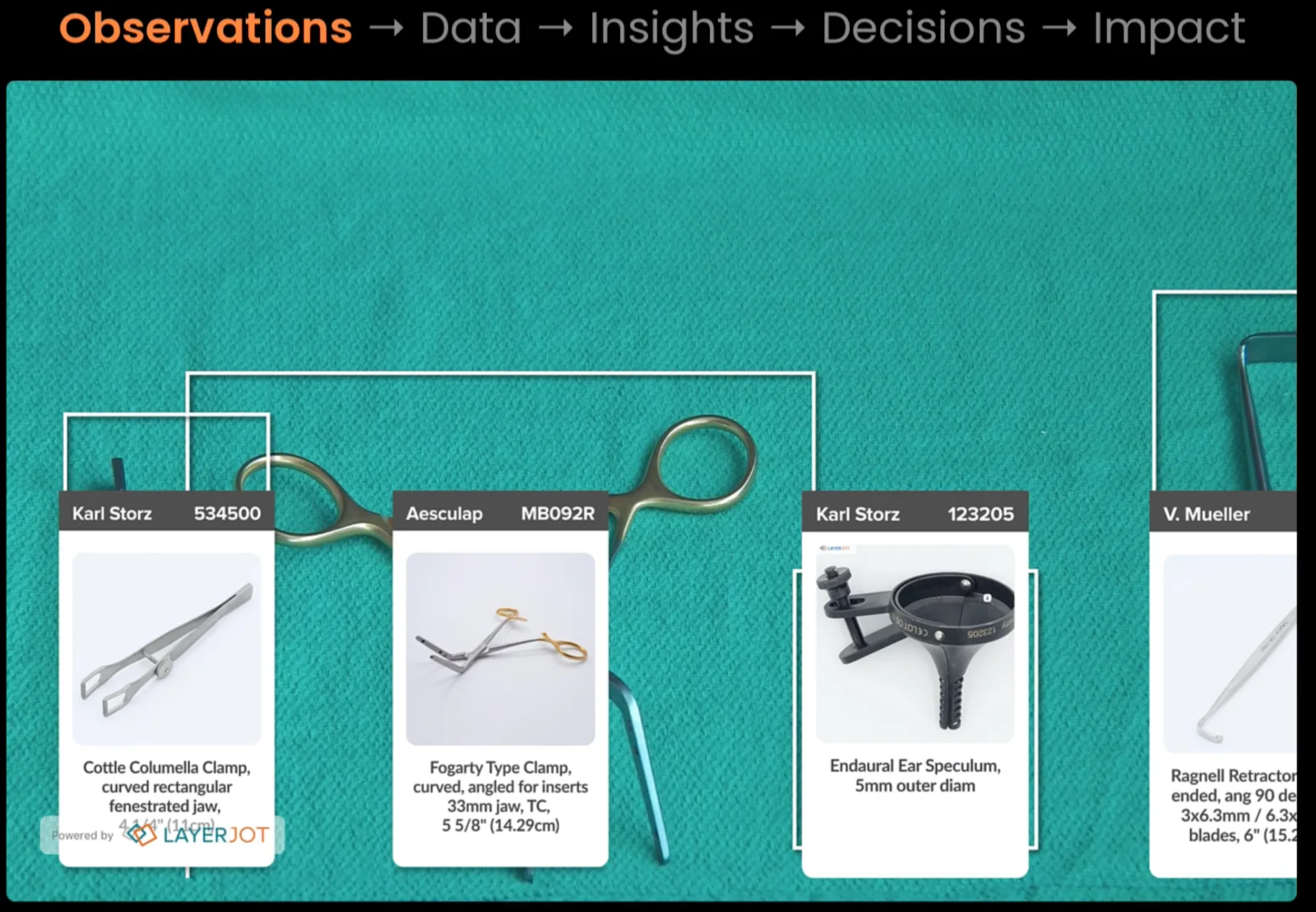
Point AVA at a tray and it identifies each instrument by manufacturer and part number, matched to catalog reference images. What was a manual count and check becomes a record.
- Each instrument tagged on sight
- Matched to the catalog entry
- Powered by LayerJot
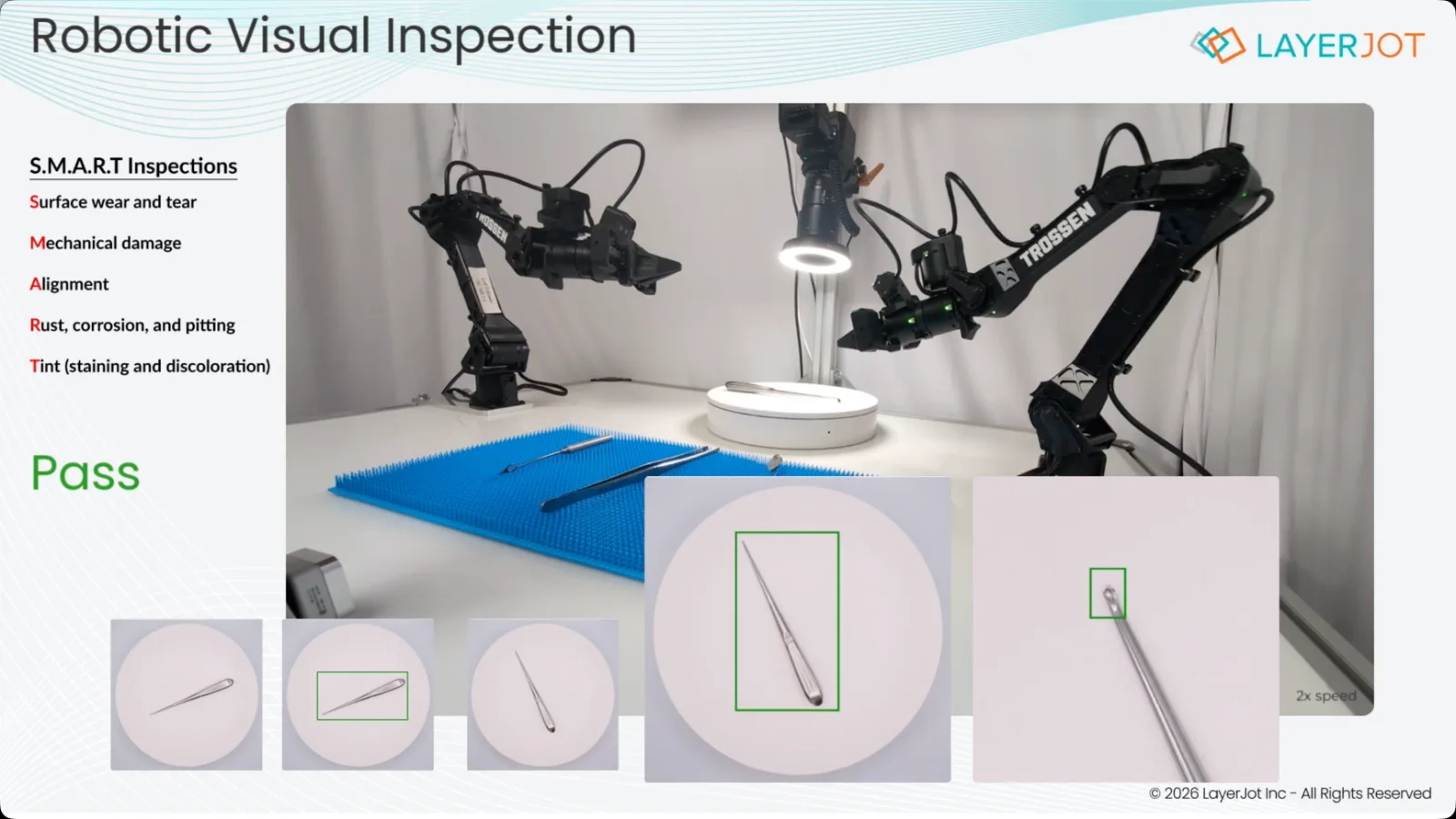
Robotic visual inspection
Cameras on robotic arms examine each instrument from every angle and return a result, with the evidence attached for review.
- Surface wear and tear
- Mechanical damage and alignment
- Rust, corrosion, pitting, and tint
Operating room flow analysis
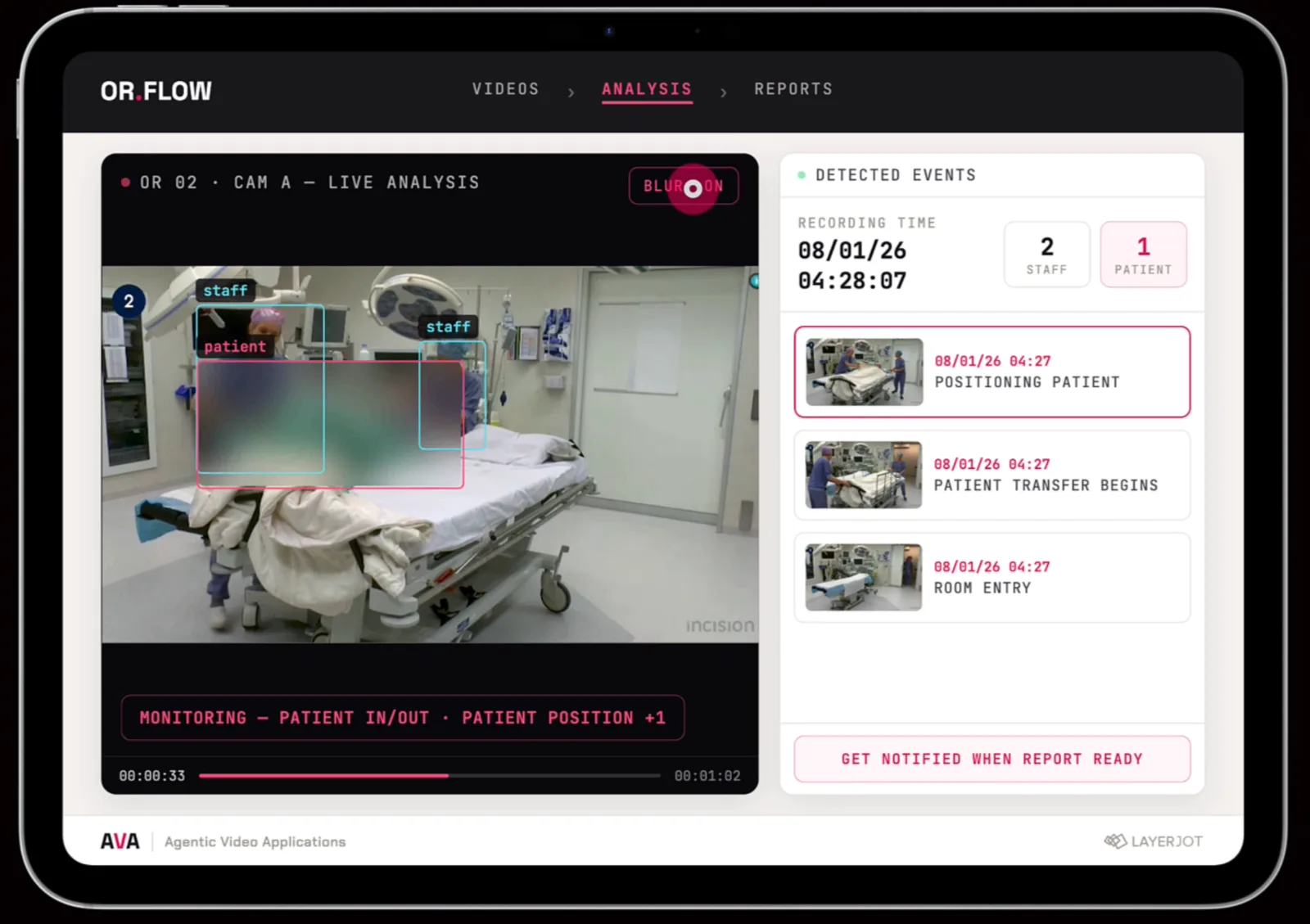
AVA watches the room and logs what happens: staff and patient detected, room entry, patient transfer, and positioning, with identities blurred. You get a notification when the report is ready.
- Events detected and timestamped
- Identities blurred by default
- Report delivered when ready
Automatic lecture recording
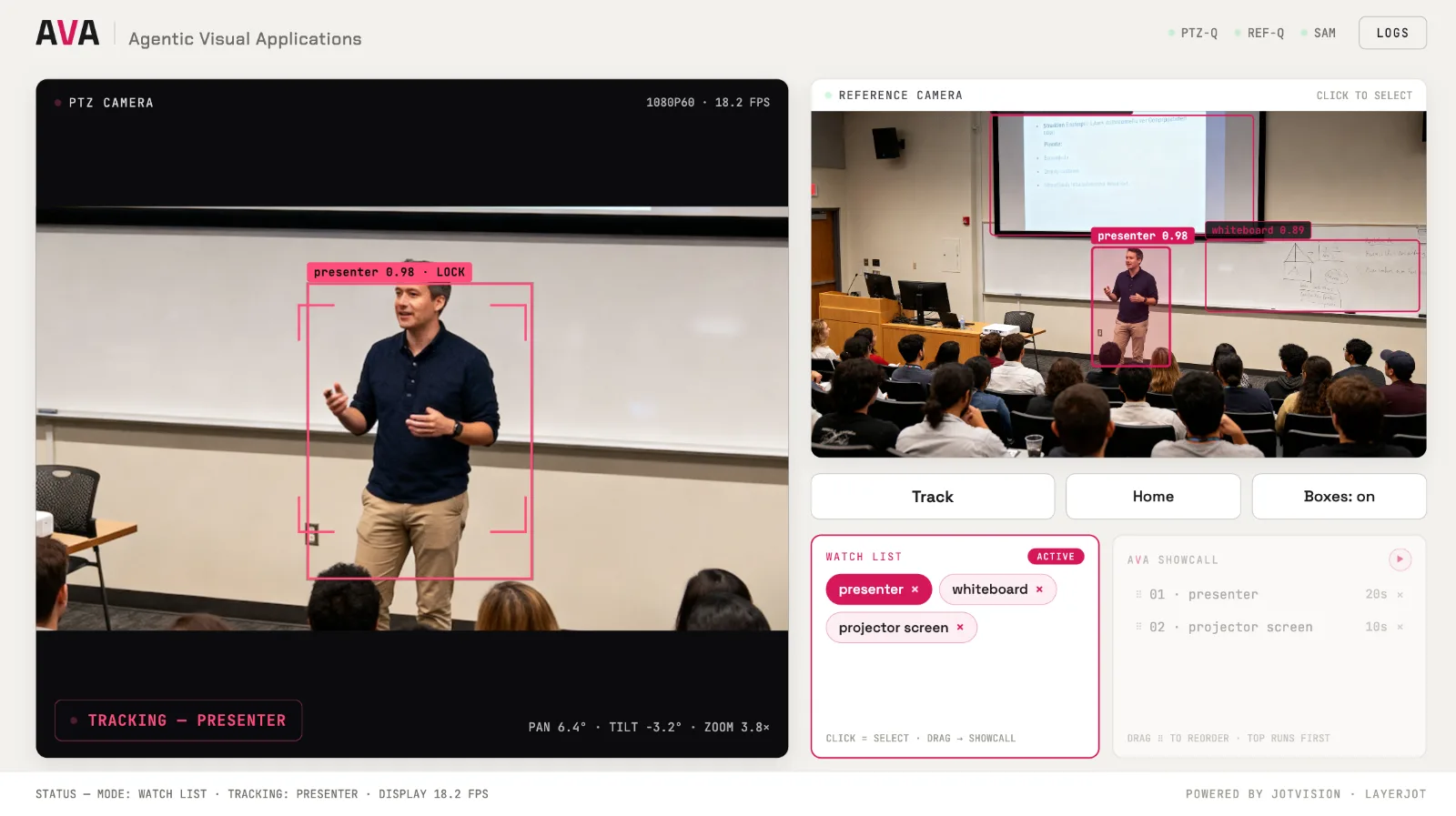
A reference camera sees the whole room while the PTZ camera follows what matters. Set a watch list and AVA locks on and frames it, with no camera operator.
- Watch list: presenter, whiteboard, projector screen
- Locks on and tracks the presenter live
- A showcall sequence cuts between subjects
Use cases, organized by the action they drive.
Different environments, one architecture.
Observe & Measure
Understand what is happening in a physical process.
Inspect & Verify
Check objects, conditions, sequence, or completeness.
Track & Record
Create structured records of physical events.
Guide & Control
Use visual understanding to influence cameras, devices, or workflows.
Trigger & Escalate
Start a business process when a real-world condition occurs.
What AVA produces
From what the camera sees to data you can act on.
Observations become usable data
Where permitted and appropriate:
- Objects
- Identities
- State
- Timestamps
- Counts
- Sequences
- Events
- Measurements
Visual context behind the result
So a result can be reviewed, not just trusted:
- Images
- Video clips
- Event history
- Timestamps
- Relevant scene context
Observation drives the next step
AVA does not stop at detection:
- Update a record
- Trigger a workflow
- Notify a person
- Escalate an exception
- Control a camera or compatible device
- Request approval
- Create a task
Privacy built in
Faces and identities can be blurred in the analysis, so the data is useful without exposing people.
Local or cloud processing
Process footage and prompts on your premises or in the cloud, whichever fits your requirements.
An API is on the way
We are working to open an API so you can build on AVA’s scene understanding. Talk to us about early access.
AVA can also control how the scene is captured.
Video and PTZ control are examples of actions AVA can take once it understands the scene.
Follow a person or object
Lock on and re-acquire through movement and occlusion.
Maintain framing
Keep the subject framed as the scene changes, with no operator in the room.
Switch viewpoints
Move between subjects, such as presenter, whiteboard, and screen.
Control compatible PTZ cameras
Direct PTZ cameras from a stated intent, in plain language.
Capture event-specific video
Record the moments that matter, wide context and close-up detail in sync.
Create review-ready records
Paired assets ready for training, inspection, QA, and incident review.
From seeing to doing.
Cameras on robotic arms let AVA examine, verify, and respond to physical objects, with a person reviewing what matters.
Partners in the physical world.
AVA works with proven hardware and specialist technology partners, so the cameras and catalogs are theirs and the intelligence is ours.
 PTZOptics
Professional PTZ cameras, controllers, and software for broadcast, education, healthcare, and manufacturing. AVA directs PTZ cameras to frame what matters.
Visit PTZOptics → LayerJot
Powers instrument identification and the catalog matching behind AVA's instrument tray application.
Visit LayerJot →Frequently asked questions
What is AVA?
AVA stands for Agentic Visual Applications. It is the visual intelligence layer of JotVision’s system of action. It observes a physical scene, identifies relevant objects, people, states, and events, creates structured data and evidence, and triggers the workflow that should happen next.
How is AVA different from computer vision?
Computer vision detects what is visible. AVA understands what matters in the context of your stated intent, and JotVision turns that understanding into action.
How do I tell AVA what to look for?
In natural language. Describe the observation or outcome you care about, such as when a tray is complete or when a step is skipped. Intent can change without rebuilding the visual application.
Can AVA use my business data as well as video?
Yes. JotVision can combine what AVA observes with enterprise context from your ERP and operational systems, to determine whether something is missing, unexpected, or needs action.
Where is video processed, and what about privacy?
Footage and prompts can be processed locally on your premises or in the cloud, depending on your requirements. Faces and identities can be blurred in the analysis.
Which hardware does AVA work with?
AVA works with compatible PTZ cameras, including PTZOptics, and with robotics hardware such as Trossen Robotics arms for robotic visual inspection.
Can I build my own applications on AVA?
Not yet. We are working to open an API so you can build on AVA’s scene understanding, tracking, and event detection. Talk to us about early access.
Show us a scene worth acting on.
Tell us what AVA should see and what should happen next: instrument checks, inspection, lecture capture, room analytics, or an application of your own. We will walk you through a live demo.
Book an intro call →